

Workstation Systems
● Call For Price
Refurbished
● Call For Price
Refurbished
● Call For Price
Refurbished
● Call For Price
Refurbished
● Call For Price
Refurbished
● Call For Price
Refurbished
● Call For Price
Refurbished
● Call For Price
Refurbished
● Call For Price
Refurbished
● Call For Price
Refurbished
● Call For Price
Refurbished
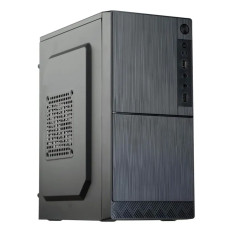
● Call For Price
Refurbished
Workstation Systems at Goto Direct - Your One-Stop Online Store!
Do you need a strong, stable, and efficient workstation system? Whether you are a creative professional, an engineer, or a data scientist, it is critical to know what qualifies a workstation computer system as exceptional. Buying workstation systems online is now common, with high-quality performance, customizability, and ease of access. In this guide, we will cover all the information you need to know about workstation systems, from their functions and classification to selecting the best one for your purposes.
What Is a Workstation Computer System?
A workstation computer system is a high-end PC that is built specifically for professional work requiring high computing power. Unlike standard desktop computers, workstations have the best hardware components—high-powered CPUs, high-end graphics cards, ample RAM, and quick storage devices—that manage demanding applications such as 3D rendering, CAD modeling, video editing, and scientific simulations.
Workstation systems are designed to be reliable, stable, and long-lasting, and they suit professionals who depend on their computers to provide accurate and consistent results. When you buy workstation systems online, you're usually selecting from a variety of options that are explicitly designed for specific industries and applications.
Why You Should Buy Workstation Systems Online
There are plenty of advantages to buying workstation systems online, particularly in the USA. Here's why:
- Availability of the Best Workstation Systems to Buy: Online shops usually carry a wider range, with leading brands such as Dell, HP, Lenovo, and bespoke models.
- Ease of Buy and Convenience: You can browse, compare, and buy from home or office.
- Exclusive Deals and Discounts: Look for the best online deals on workstation systems, which can include discounts, bundles, or promotional offers.
- Fast Shipping and Support: Many online stores offer fast shipping, warranty, and support, ensuring your workstation arrives ready to use.
- Buy Workstation Systems Online USA: There are numerous specialist IT hardware shops dedicated to serving the US customer base, offering customized customer service and technical support.
Types of Workstation Computers
There are different types of workstation computers, each designed for diverse professional requirements:
- Desktop Workstations: These are high-performance, traditional desktop PCs ideal for demanding tasks. Some examples include Z Workstation desktop PCs, ThinkStation Series, and Dell Precision Series.
- Workstation Laptops: Powerful yet mobile, workstation laptops such as the ThinkPad P Series or mobile HP workstations enable professionals to stay productive while on the move without compromising performance.
- Custom-Built Workstations: For users who require specialized hardware, custom-built workstation PCs online provide freedom to select components such as AMD or Intel processors, large-capacity RAM, and professional-class graphics cards.
ThinkPad P Series & ThinkStation Series
These brands have established themselves as industry leaders for workstations. ThinkPads are known for ruggedness and performance, while ThinkStations are designed for applications such as CAD and 3D rendering.
Z Workstation Desktop PCs
Made by Lenovo, Z series workstations provide outstanding power, scalability, and reliability for professional purposes.
AMD and Intel Workstations
AMD and Intel processors are both widely used in workstations. AMD Ryzen Threadripper and Intel Xeon processors are commonly employed in high-end systems, providing excellent performance for heavy applications.
System76 Workstations
A great option for Linux users, System76 provides high-performance, customizable workstations with an emphasis on open-source compatibility.
How Much Do Workstation Computers Cost?
Knowing the cost of the computers at a workstation is essential when buying workstation systems online. The price depends on hardware features, brand, and customization.
- Low-Priced Workstation Systems: Basic workstations may be priced from $1,000 to $2,000, ideal for less taxing tasks.
- Mid-Range Workstations: These typically cost between $2,000 and $4,000, providing a mix of performance and affordability.
- High-End Workstations: Advanced systems with powerful CPUs, GPUs, and huge memory sizes range from $5,000 and upwards.
Workstation System Price Determinants
- Processor (CPU): AMD Ryzen Threadripper or Intel Xeon CPUs are more expensive.
- Graphics Card: Professional graphics cards, such as NVIDIA Quadro or AMD Radeon Pro, are more costly.
- Memory (RAM): Higher RAM capacities (32GB, 64GB, or greater) contribute to the price.
- Storage: SSDs, particularly NVMe drives, cost more but provide speed benefits.
- Brand and Customization: Quality brands such as Dell and HP might be more expensive but offer better support.
What Are Some Examples of Workstation Computers?
The following are some of the best examples of workstation computers found in the USA:
- Dell Precision Series: Known for reliability and high performance.
- HP Z Series Workstations: Designed for demanding professional applications.
- Lenovo ThinkStation P Series: Rugged and robust, suitable for engineering and design.
- System76 Oryx Pro: Linux-friendly, customizable, and high-performance.
- ThinkPad P Series & ThinkStation Series: Trusted by professionals worldwide.
- AMD and Intel-based Workstations: Flexible solutions designed for different workloads.
What Are the Best Workstation Systems to Buy?
Your particular requirements determine the best workstation system to buy, but some of the best ones are:
- Dell Precision 5820 Tower: Flexible and upgradable, ideal for engineering and 3D modeling.
- HP Z8 G4 Workstation: Extremely high-performance for scientific calculations and video production.
- Lenovo ThinkStation P920: For compute-intensive simulations and CAD use.
- Custom-Built Workstations: For the ultimate performance, ordering a custom workstation online enables you to choose components specific to your workflow.
How to Select the Right Workstation System?
When buying workstation systems online, take the following into account:
- Planned Usage: CAD design, 3D modeling, video editing, scientific simulations, etc.
- Hardware Compatibility: Make sure the system is compatible with the software you use.
- Performance Needs: CPU performance, GPU quality, RAM capacity, and storage speed.
- Budget: Cost vs. performance balance.
- Support & Warranty: Choose systems that have good warranty and support services.
- Upgradeability: Future-proof your investment using systems that can upgrade hardware.
Why Are Workstation Systems Superior to Personal Computers?
Although personal computers are geared towards general usage, workstation systems are geared towards professional workloads. They offer:
- Higher-Performance Hardware: Professional-quality CPUs and GPUs.
- Reliability & Stability: Built for 24/7 use and critical applications.
- Enhanced Support & Warranty: Improved service options.
- Certification: Several workstations are ISV-certified for particular professional applications.
- Expandability: Simplified upgrades to keep pace with changing requirements.
Are Workstations Worth It?
Yes! For professionals where work is based on superior computing performance, a high-end workstation system investment can pay for itself many times over through increased productivity, minimal downtime, and hassle-free handling of demanding applications.
How Long Do Workstation Laptops Last?
A properly maintained workstation laptop can last 4 to 6 years, depending on usage and the quality of hardware. Particularly high-end laptops, such as ThinkPad P Series, are made with durability in mind and can even last longer if taken care of appropriately.
What Laptop Brand Has the Most Extended Lifespan?
These brands, such as Lenovo (ThinkPad line), Dell (Latitude and Precision line), and HP (ZBook line), are known to be long-lasting and rigid, which is why they are the most preferred by individuals who want laptops with the most extended lifespan for work.
Frequently Asked Questions
Q1: What is a workstation computer system?
A: A workstation computer system is an industrial PC that is high-performance and built for professional use involving tasks of great computing power, including 3D modeling, video editing, scientific simulation, and engineering applications.
Q2: What is a workstation example?
A: Examples are Dell Precision towers, HP Z series workstations, Lenovo ThinkStation P series, and bespoke workstations tailored to individual requirements.
Q3: What are the three most popular workstation operating systems?
A: The three most popular workstation operating systems are Windows (particularly Windows 10 Pro and Windows 11), Linux (Ubuntu, Fedora), and macOS (running on Apple's high-end hardware).
Q4: What is the difference between a workstation and a laptop?
A: A workstation laptop balances portability with powerful hardware, while a desktop workstation has more power and expandability but less portability.
Q5: Can a laptop be used as a workstation?
A: Yes, a high-end laptop such as the ThinkPad P Series or HP ZBook is being used as a mobile workstation, intended to provide workstation performance while on the move.
Q6: What are the disadvantages of a workstation computer?
A: Disadvantages: more expensive, bigger, and sometimes more complex to set up and maintain than personal computers.
Q7: How is a Dell laptop different from a workstation?
A: Dell laptops are general-purpose, but Dell's workstation laptops (such as the Precision line) are intended for heavy-duty professional applications, with superior hardware and certifications.
Q8: Are workstations superior to personal computers?
A: For high-performance professional work demanding dependability and expandability, yes. Workstations are designed for such loads, as opposed to personal computers.
Q9: Is a workstation worth it?
A: For designers, engineers, data scientists, and video editors, the expenditure on a workstation system is worthwhile through improved productivity and reliability.
Q10: How long do workstation laptops last?
A: On average, 4 to 6 years, based on usage, the quality of the hardware, and servicing.
Q11: Is a 10-year-old laptop still good?
A: Usually, no. It might not have the hardware capacity to support contemporary software and professional workloads efficiently.
Q12: What is the laptop brand with the longest lifespan?
A: Lenovo (ThinkPad), Dell (Latitude and Precision), and HP (ZBook) have a reputation for durability and lifespan, which makes them leading competitors for professional use in the USA.
Feel free to surf the best online shop for workstation PCs at Goto Direct, shop top-rated brands such as Dell and HP, and pick the perfect system that suits your business requirements. If you prefer to have a high-end workstation computer or a custom workstation PC online, the ideal selection can boost your productivity and make your work at its peak.